What changed on August 1 and the five-year picture
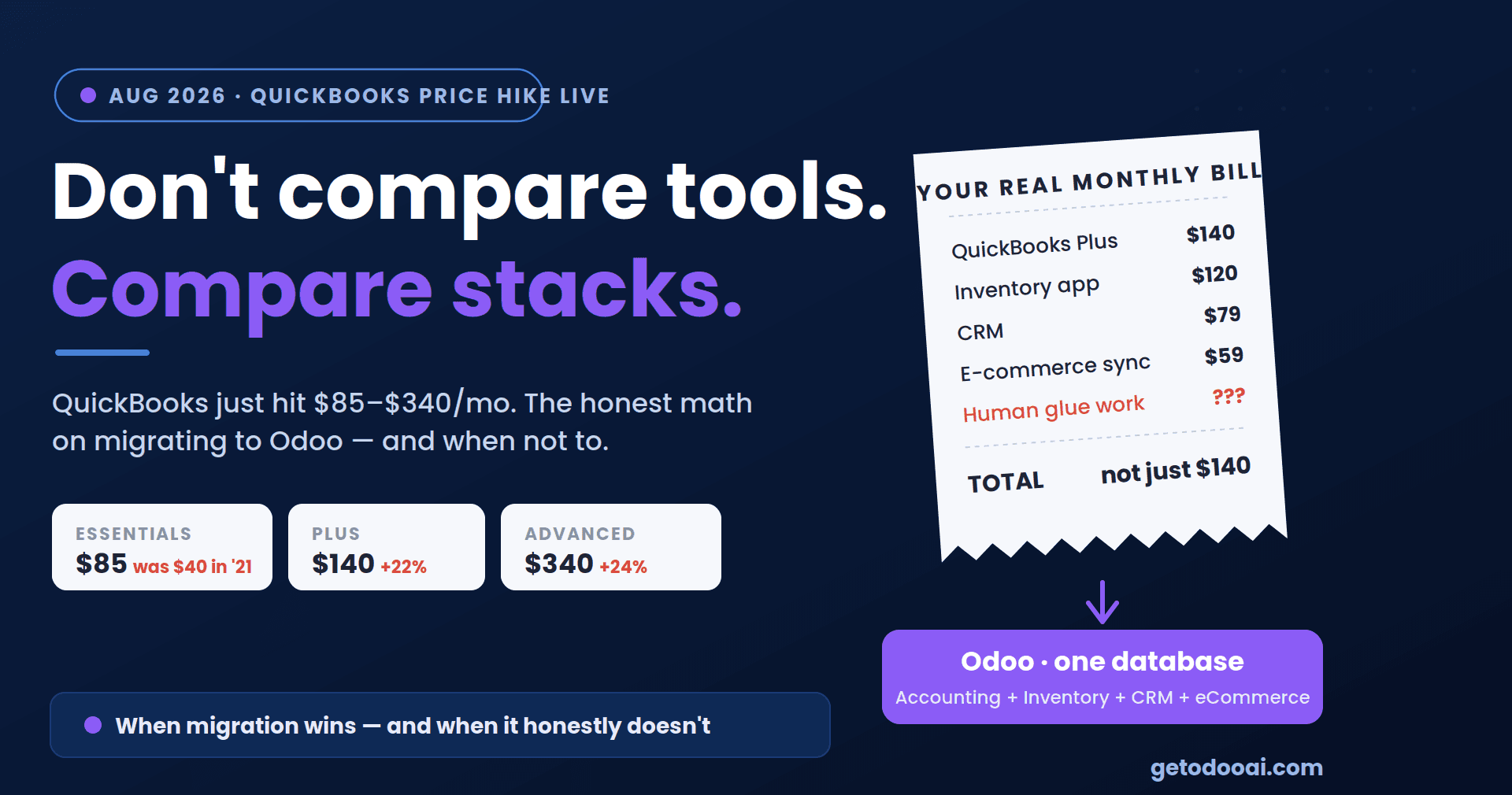
The headline numbers, from Intuit's published list prices: Essentials moved from $75 to $85 a month, Plus from $115 to $140, and Advanced from $275 to $340. The new rates apply to new subscribers immediately and to existing customers at their next renewal, which is why this is landing on invoices right now, one billing date at a time.
Intuit's stated reason is value added: the tiers now bundle AI features (Continuously Clean Books, Invoicing on Autopilot, Conversational Business Intelligence), and Advanced now includes Workforce Elite payroll, previously a $160–250/month add-on. Fair is fair: if you were already paying for payroll separately, your net increase on Advanced may be modest. If you weren't, it's a 24% jump for features you didn't ask for.
Zoom out, and the trend is harder to shrug off. Essentials cost $40/month in 2021; it's $85 now. Advanced went from $150 to $340 in the same window. QuickBooks Payroll rose roughly 20% in this cycle too, and with about two-thirds of subscribers bundling it, a typical combined bill moved from around $170 to $215 a month. Meanwhile, Desktop Pro and Premier are no longer sold to new customers at all; the only Desktop path left is Enterprise, from $2,210 per year, per user.
None of this makes QuickBooks bad software. It makes it software whose price trajectory you should now plan around rather than be surprised by.
The mistake most businesses make next
The reflex response to a price hike is to compare QuickBooks against another accounting tool, line by line, $140 versus $78. That comparison is the right one for some businesses, and completely misleading for others, because it quietly assumes accounting software is the whole picture.
For most growing product or service businesses, QuickBooks isn't standing alone. It's standing next to an inventory app, a CRM, an e-commerce platform, a project tracker, a payroll service, and, the tell, the spreadsheets that shuttle data between them because none of these tools share a database. Each has its own subscription, its own admin, and its own version of the truth.
If that describes your stack, the question the price hike should trigger isn't "which accounting tool is cheapest?" It's: "what does our whole stack cost, in subscriptions and in glue work, and what would one connected system cost instead?"
When leaving QuickBooks does NOT mean Odoo (an honest section)
Let's rule people out before ruling anyone in:
You need bookkeeping, full stop. Invoices, expenses, bank feeds, tax reports, no inventory, no manufacturing, no multi-channel sales. Then an ERP is overkill, and moving to one would be trading a price problem for a complexity problem. Look at Xero, Zoho Books, or Wave; they're built for exactly you.
You're basically satisfied and only the price stings. Audit which tier features you actually use; many businesses on Plus use an Essentials-sized footprint. Then call Intuit and mention a credible intent to cancel; retention discounts have historically been available. Downgrading plus negotiating can claw back most of the hike without a migration's disruption.
Your accountant's workflow is deeply QuickBooks-shaped, and your operations are simple. Accountant fluency is worth real money. Don't spend it casually.
When the math genuinely favours Odoo
The consolidation case gets strong when several of these are true:
You're paying for tools QuickBooks can't replace. A separate inventory system, CRM, field-service app, or e-commerce backend — each $50–300/month, sitting alongside QuickBooks. Odoo's modular apps (Accounting, Inventory, CRM, Sales, eCommerce, Manufacturing, HR) run on one database, so the customer record, the stock level, and the invoice are the same object, not three synced copies.
Your team re-types data between systems. Every export-import cycle and reconciliation spreadsheet is payroll spent on middleware. That cost never appears on a subscription invoice, which is why it never gets budgeted, and never goes away.
You're hitting structural walls, not just price walls. Multi-entity consolidation, manufacturing BOMs, warehouse routing, serious e-commerce volume- the places where QuickBooks needs a workaround and an ERP has a feature.
The per-user math at your size. Odoo Enterprise is priced per user on a flat all-apps model; for teams that would otherwise stack QuickBooks Advanced plus three or four satellite tools, the consolidated number frequently comes in at or below the stack it replaces. Run your own totals, and confirm current Odoo pricing directly, as it varies by region and plan.
What a QuickBooks-to-Odoo migration actually involves
No hand-waving, here's the real shape of it: your chart of accounts is mapped, not blindly copied (this is the moment to fix the numbering mess of 2019). You make the history decision: migrate open balances and open invoices only (faster, cleaner, auditors keep QuickBooks read-only for history) or bring full transaction history (heavier, but everything in one place).
Customers, vendors, products, and outstanding documents are imported and validated. Then you run one parallel month; both systems live, before cutting over. Done properly, the accounting side of a migration is measured in weeks; it's the surrounding modules (inventory, CRM) that set the timeline, because that's where the consolidation value is.
The bottom line
Price hikes are a bad reason to panic and a good reason to audit. If the audit shows a bookkeeping tool wearing a bookkeeping-sized job, buy a cheaper bookkeeping tool. If it shows one login among six, held together by exports and a very patient operations person, the hike is just the invoice for a decision you'd already outgrown.
Want the audit done for you? Book a free migration assessment with GetOdooAI; we'll total your current stack, map what Odoo would replace, and give you the honest verdict, including "stay on QuickBooks" if that's what your numbers say.